Not all incidents originate from monitoring platforms. When you observe issues directly, receive customer reports, or need to test the RCA workflow before configuring webhooks, manual incident creation provides immediate access to CloudThinker’s AI-powered investigation capabilities. Manual logging ensures every issue—whether detected by automated alerts or human observation—receives structured tracking and systematic root cause analysis.Documentation Index
Fetch the complete documentation index at: https://docs.cloudthinker.io/llms.txt
Use this file to discover all available pages before exploring further.
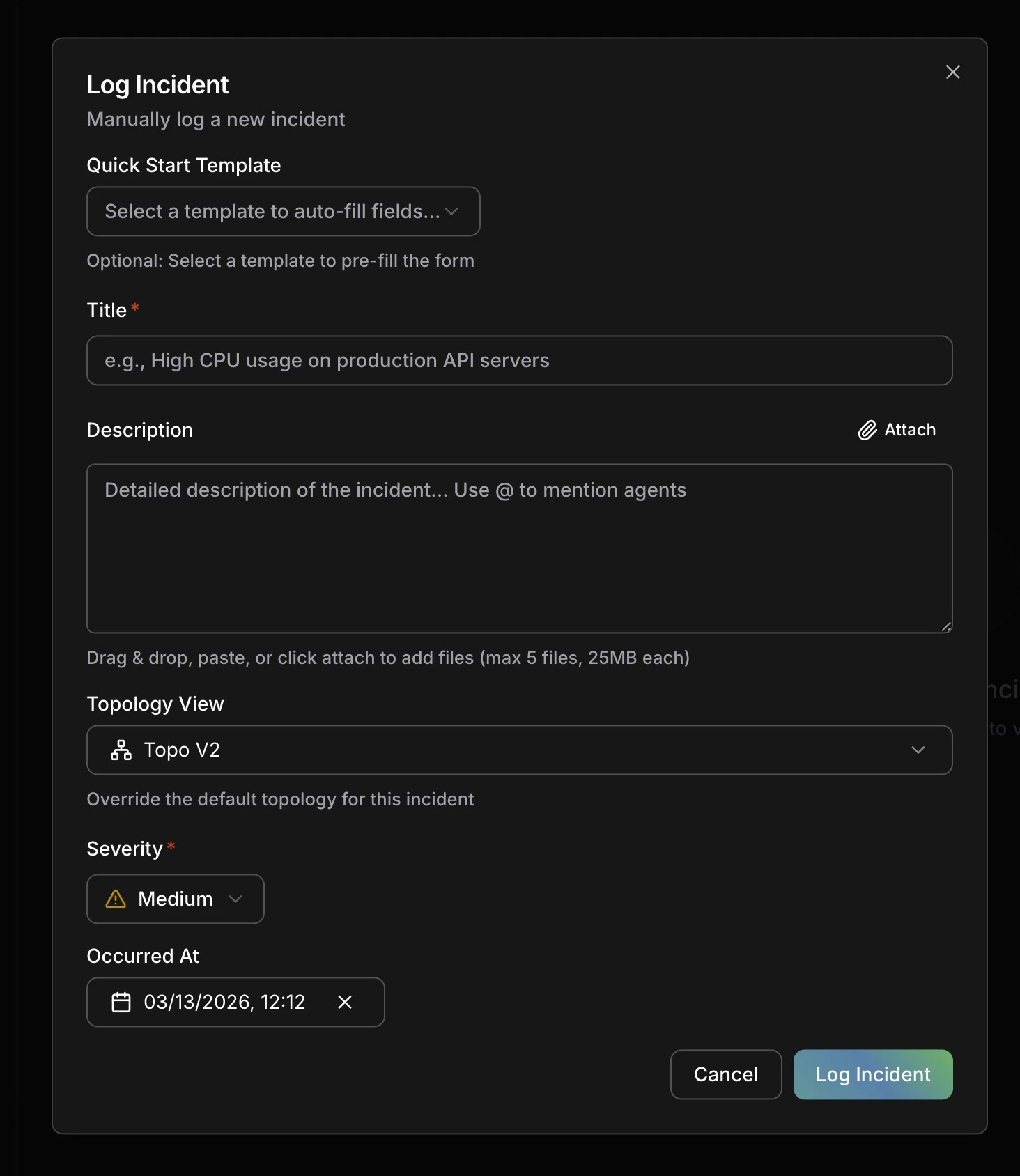
Creating an Incident

Manual incident creation form
Required Fields
Title- Concise summary of the incident (e.g., “API Gateway 503 errors in production”)
- Appears in incident list and notifications
- Used by AI agents to understand incident scope
- Detailed context about what’s happening
- Observable symptoms and customer impact
- Timeline of events if known
- Any initial troubleshooting steps already attempted
- Use
@to mention specific agents (e.g.,@alex,@tony) to direct the investigation
- Click the Attach button next to the description, or drag & drop files directly into the form
- You can also paste images from your clipboard
- Attach screenshots, log files, error exports, or any supporting evidence
- Limits: up to 5 files, 25MB each
- Attached files are available to AI agents during investigation, giving them additional context to identify root causes faster
Critical: Complete service outage, data loss, or security breachHigh: Major functionality degraded, significant customer impactMedium: Partial functionality affected, workarounds availableLow: Minor issues, minimal customer impact
- Select from your topology map
- Helps RCA agents prioritize investigation scope
- Determines which specialized agents are activated
- Can be updated after investigation reveals additional impact
What Happens Next
Once saved, CloudThinker automatically:- Queues RCA Task: AI investigation begins in background within seconds
- Activates Agents: Specialized agents (Alex, Tony, Kai, Oliver) analyze your infrastructure based on affected services
- Builds Timeline: Investigation findings logged in real-time with hypothesis tracking
- Identifies Root Cause: Hypothesis-driven analysis with structured evidence chains
- Suggests Remediation: Actionable steps prioritized by impact and urgency
When to Use Manual vs Webhook Creation
| Scenario | Recommended Method |
|---|---|
| Monitoring platform alerts | Webhook Integrations |
| Customer-reported issues | Manual Logging |
| Testing RCA workflow | Manual Logging |
| Ad-hoc investigations | Manual Logging |
| Proactive health checks | Manual Logging |
| Observed degradation (pre-alert) | Manual Logging |
Next Steps
Root Cause Analysis
Understand how AI agents investigate incidents and build evidence chains
Webhook Integrations
Automate incident creation from PagerDuty, Datadog, Prometheus, and 11+ platforms