

Prerequisites
- A Scale, Scale+, or Enterprise plan — see Pricing & Plans.
- The Admin workspace role — organization Owners and Admins have it in every workspace. Developers and Viewers see the Branding page in view-only mode: inputs are disabled and the Save button is hidden.
- Your logo file: PNG, JPEG, WebP, or SVG, under 5 MB. A horizontal layout with transparency, at least 400 px wide for raster formats, renders best.
Set up branding
1
Open Workspace Settings → Branding
Click your workspace name in the top navigation bar, choose Workspace Settings, then select the Branding tab (palette icon). The page opens with the editor on the left and a live PDF preview on the right — the preview redraws as you type, so you never need a test export to check your work.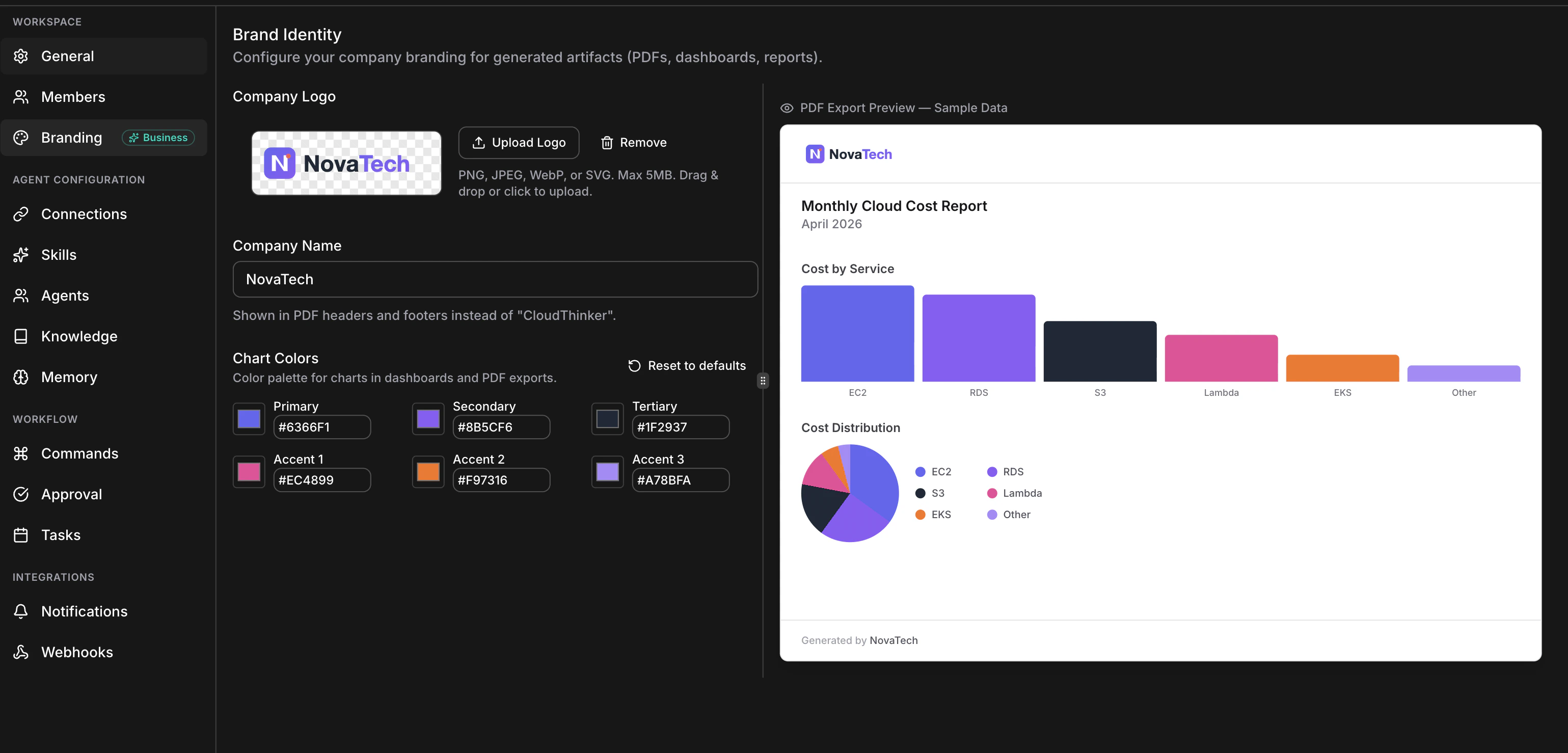
Full Branding page layout — editor and live preview side by side
2
Upload your logo
Drag your file onto the upload zone, or click Upload Logo and pick a file. When the upload finishes, your logo appears on a checkerboard background so you can verify transparency, and a Remove button appears.To replace a logo, upload a new file — the old one is deleted from storage automatically.
Logo uploads commit immediately — they don’t wait for the Save button. Save Brand Settings covers only the company name and colors.
3
Enter your company name
Type your name into the Company Name input (max 255 characters). It replaces “CloudThinker” in the footer of every PDF page, as “Generated by <Your Company Name>”. Special characters are escaped safely.
4
Set your chart colors
Each of the six slots — Primary, Secondary, Tertiary, Accent 1–3 — has a color swatch that opens your system color picker and a synchronized hex input (
#RRGGBB). Paste hex codes from your brand guidelines, or eyedrop them from your logo with the OS picker.If you only care about one brand color, set Primary and leave the other five at defaults — the defaults are designed to harmonize. Reset to defaults reverts all six slots (you still need to save).5
Save
Click Save Brand Settings. Only changed fields are sent.Success state: a green confirmation message reads “Workspace updated successfully.” On failure, a red error message states the reason and your form values are preserved for retry.
6
Verify with a real export
Open any artifact and click Download. The PDF shows your logo top-left in the header on every page (up to 160 px wide), charts in your six colors, and “Generated by <Your Company Name>” in the footer.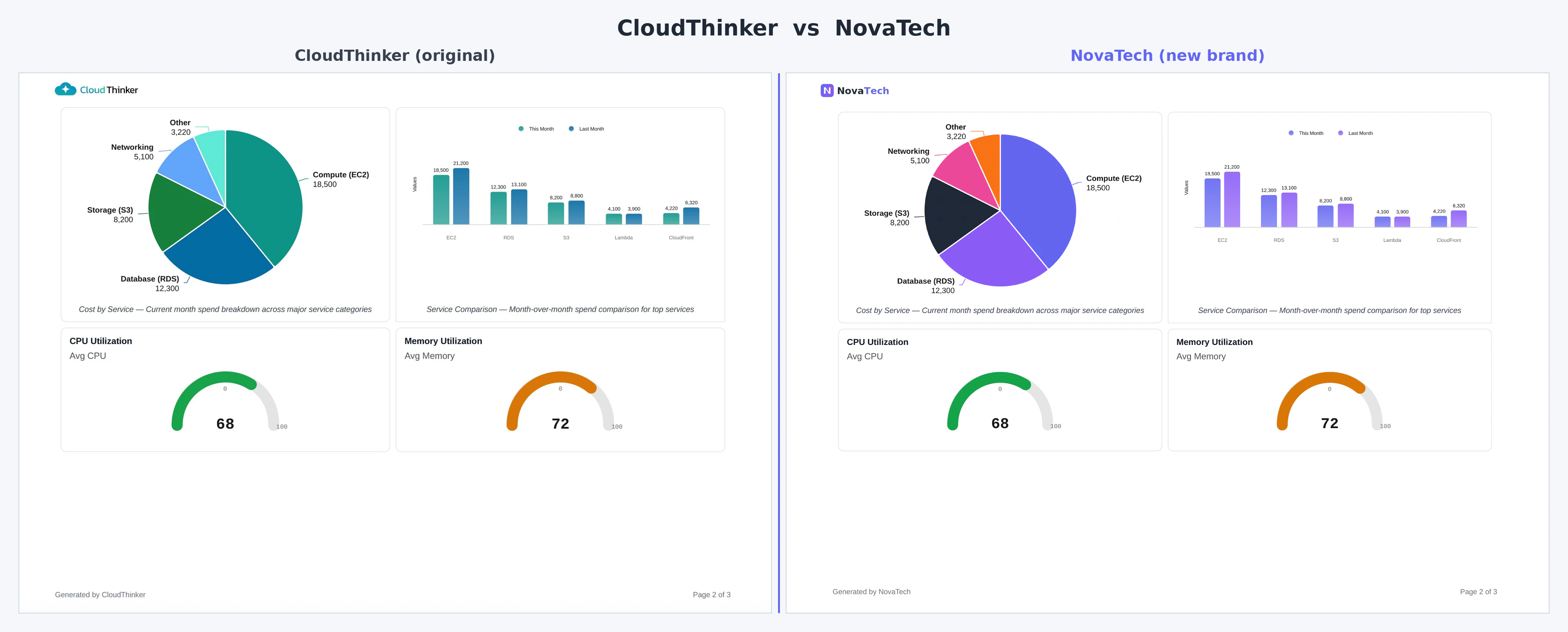
Before and after: a default CloudThinker PDF (left) versus a fully branded export with custom logo, company name, and palette (right)
Picking a 6-color palette
Chart libraries cycle through your slots in order — a 4-series bar chart uses Primary through Accent 1; an 8-slice pie chart wraps back to Primary for slices 7 and 8. A few rules of thumb:- Start with your primary brand color in the Primary slot — it becomes the default series color.
- Vary hue, not just brightness. Six shades of blue make multi-series charts unreadable.
- Keep contrast against white. PDFs render on white; very pale colors disappear on bar and line charts.
- Mind color-blind viewers. Avoid placing red and green next to each other.
- Iterate in the live preview. Edit a color, check the sample bar and pie charts, adjust.
Reference: limits and validation
Logo
Company name
Chart colors
Default palette (every new workspace):
Where branding applies
Plans and roles
Organization Owners and Admins hold the Admin role in every workspace, so they can edit branding anywhere. See roles and permissions.
FAQ
My new PDF still shows the old logo
My new PDF still shows the old logo
Replacing a logo normally takes effect on the next export, but logo updates can take up to ~10 minutes to appear. If the old logo persists after a few minutes, refresh the workspace page and export again; if it continues, contact support with your workspace ID.
My logo looks blurry, or has a white square around it
My logo looks blurry, or has a white square around it
Blurry: your source image is smaller than the 160 px render width and gets upscaled — re-export at 400 px wide or more, or use SVG. White square: your file has no transparency — export with a transparent canvas (PNG with alpha, or SVG). If an SVG renders differently than in your design tool, it likely relied on scripts or animations that sanitization strips; export a static PNG instead.
PDFs I downloaded earlier still show old branding
PDFs I downloaded earlier still show old branding
Expected. Each PDF is generated at export time with the branding active at that moment, and existing artifacts have no cached PDF — re-download any artifact to get a fresh PDF with current branding.
Can different workspaces in my org have different branding?
Can different workspaces in my org have different branding?
Yes. Branding is scoped to each workspace, not the organization, so an org with one workspace per customer, environment, or business unit can brand each independently.
Can I export without branding, for a draft or internal review?
Can I export without branding, for a draft or internal review?
Not currently — every export uses the active branding. As a workaround, remove the logo and clear the company name, export, then restore your branding.
Is my uploaded logo private?
Is my uploaded logo private?
Yes. Logos are stored per workspace, and members of other workspaces cannot access them. Artifacts you share publicly via share links do include your logo and colors.
Next steps
Artifacts
Generate the dashboards and reports your branding applies to
Manage Workspaces
Create and manage workspaces within your organization
Manage Organization
Configure organization settings, billing, and enterprise features
Pricing & Plans
See which plans include workspace branding