

Prerequisites
- An Atlassian Cloud organization on any plan (Free, Standard, Premium, or Enterprise).
- Organization Admin role to add the CloudThinker domain in Atlassian Administration.
Only an Organization Admin can add domains in Atlassian AI settings. Once added, all workspace members can use the integration within their existing permissions.
Setup
1
Open Atlassian Administration
Go to admin.atlassian.com → Apps → AI settings → Rovo MCP server.
2
Add the CloudThinker domain
Click Add domain and enter:Click Save.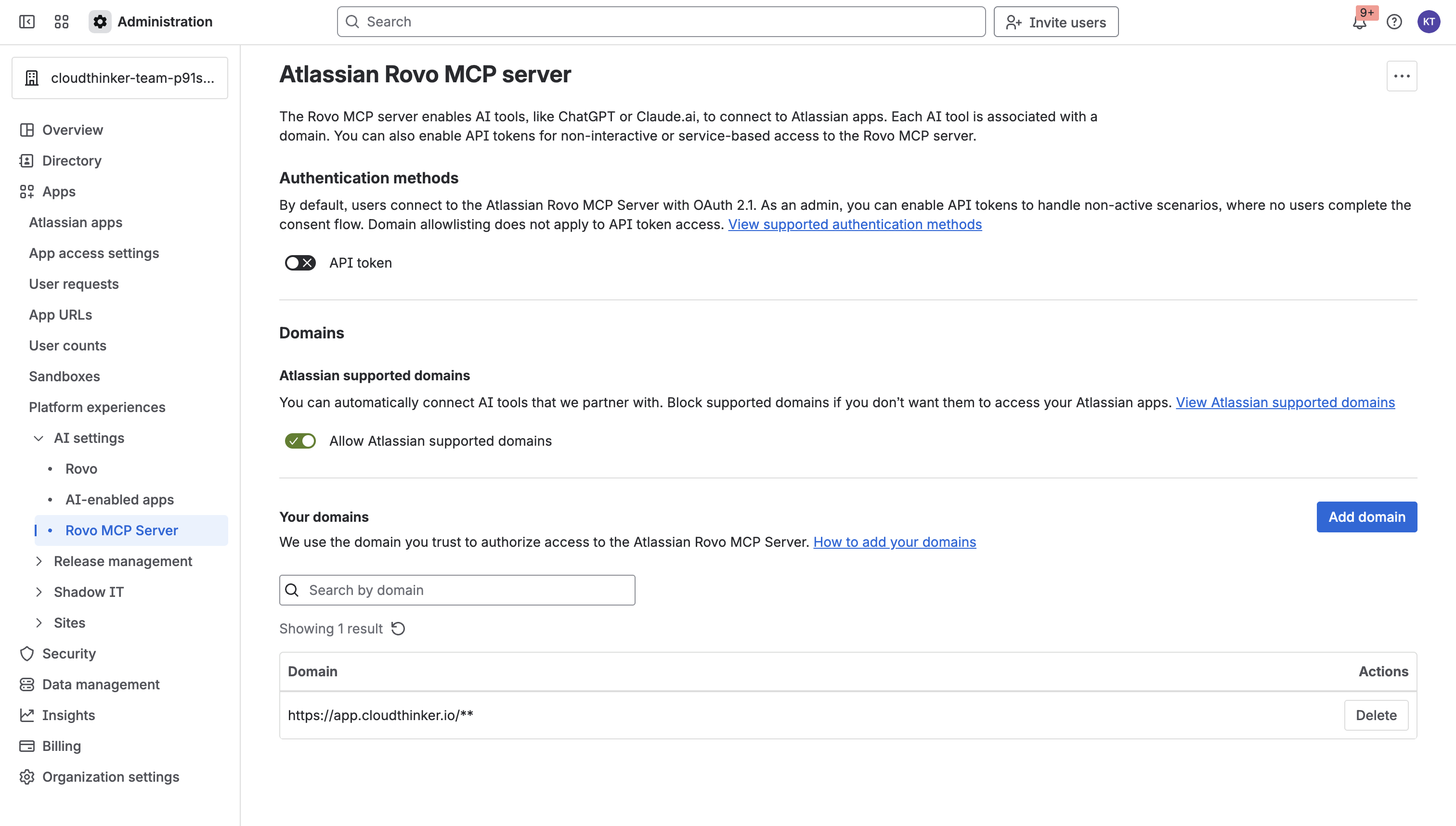
Atlassian AI settings — Rovo MCP server domain allowlist
3
Configure IP allowlisting (if applicable)
If your organization enforces IP allowlisting, configure the allowlist under Atlassian Administration (not in AI settings). Requests must come from allowed IPs even for trusted domains.After saving, CloudThinker shows a Connected status for the Atlassian integration.
Connection details
Required permissions
- Organization Admin role is required to add the domain during setup.
- Once connected, agents act with the existing permissions of the authorizing user — CloudThinker cannot access Jira projects or Confluence spaces the user cannot see.
Agent capabilities
Once connected, agents can access Jira and Confluence data within the authorizing user’s permissions.Verify the connection
Example prompts
Troubleshooting
Domain not in allowlist
Domain not in allowlist
CloudThinker cannot connect because the domain was not saved. Return to admin.atlassian.com → Apps → AI settings → Rovo MCP server and confirm
https://app.cloudthinker.io/** appears in the list.IP allowlisting blocking requests
IP allowlisting blocking requests
Users on blocked IPs see a permission error even when the domain is allowlisted. Add CloudThinker’s IPs under Atlassian Administration (not in AI settings) and ensure requests originate from allowed addresses.
Permission denied on Jira project or Confluence space
Permission denied on Jira project or Confluence space
CloudThinker acts with the authorizing user’s permissions. Ensure the authorizing user has access to the Jira projects and Confluence spaces you want agents to reach.
Connection not appearing in CloudThinker
Connection not appearing in CloudThinker
Domain allowlist changes can take a few minutes to propagate. Wait briefly, then refresh the CloudThinker Connections page.
Security
- Least privilege — grant only the permissions the agents need for your use case; start read-only and widen later.
- Read-only by default — use read-only credentials unless you want agents to make changes through this connection.
- Rotate credentials — rotate keys and tokens on your normal schedule; CloudThinker picks up the new value when you update the connection.
- Revoke on offboarding — remove the credential at the provider when you delete a connection or a teammate leaves.
- Organization Admin only — only an Organization Admin can add or remove the CloudThinker domain; audit this permission list regularly.
- User-bounded access — CloudThinker actions are bounded by the authorizing user’s Atlassian permissions; always authorize from a least-privilege account.
Related

GitGuardian Connection
Track secret incidents as Jira issues

ServiceNow Connection
ITSM incident management