

@agent #tool instruction syntax and the # picker that inserts these tags.
#visualize
#visualize produces a standalone chart from data in the conversation, rendered directly in the chat. For a chart inside a broader view, ask for a #dashboard or #report instead — charts are components of both artifact types.
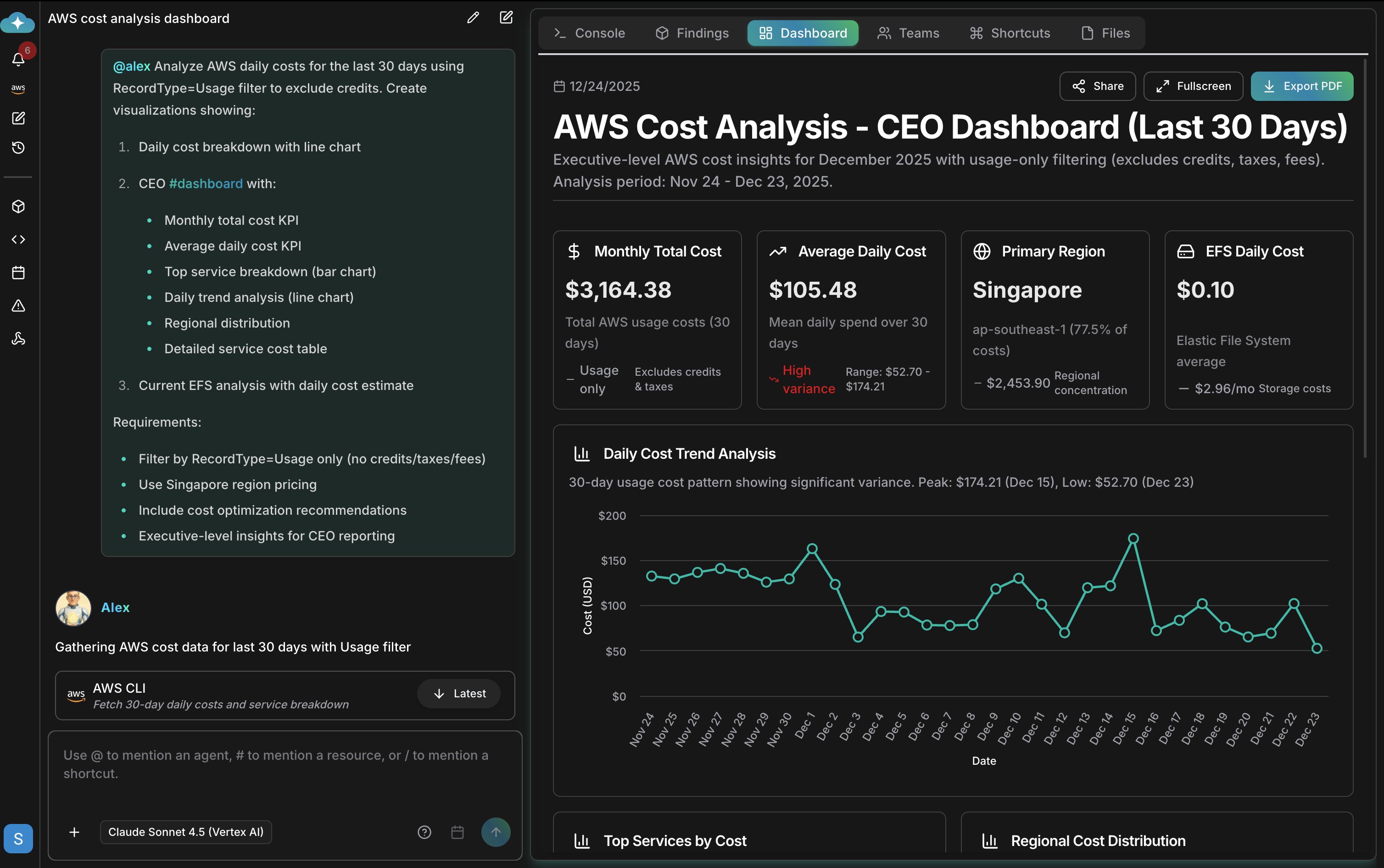
#dashboard
#dashboard produces an interactive dashboard with live metrics from your connections. It opens in the conversation’s dashboard panel, and you can filter views, go fullscreen, and export to PDF. Dashboards are saved as artifacts for sharing and later reference.
#report
#report produces an analysis document with an executive summary, detailed findings, and prioritized recommendations. Reports open in the conversation’s report panel and download as PDFs.
#tabular_engine
#tabular_engine runs SQL analysis over a tabular file you attach to the conversation — a CSV export or a spreadsheet. Attach the file, then ask your question; the agent queries the imported table and answers from the results.
#slide
#slide builds a slide deck from the conversation’s findings. Run the analysis first, then ask for the deck that summarizes it.
#alert
#alert produces a monitoring notification triggered on the condition you define. An alert appears as a card with a title, summary, and severity — Critical, High, Medium, or Low — and can be routed to your configured destinations in Notifications.
#schedule
#schedule creates a scheduled or recurring run of the instruction instead of executing it once now. For stored instructions with schedule, webhook, or repository triggers, see Automations.
#search
#search researches the web and combines what it finds with your infrastructure data. Use it for information that lives outside your connections — vendor announcements, security advisories, pricing changes.
#search-knowledge-base
#search-knowledge-base searches every knowledge base in the workspace and answers from the matching documents. Use it to pull internal runbooks — step-by-step operational procedures — policies, and standards into a conversation. To search one collection only, tag its name instead — see mention a knowledge base.
#recommend
#recommend produces actionable recommendations prioritized by impact, with effort estimates and implementation steps. It has no picker entry — type it by hand right after the mention. Use it when you want the agent to tell you what to change, not just what it found.
Image generation
Agents can also create images — no tool tag needed. Ask in plain language for a diagram concept, a launch graphic, or a mockup, and your first request produces three concept images in a grid. The Images tab of the side panel opens automatically to show them. To refine a concept:- Click an image to open it, then choose Select area.
- Draw up to eight rectangles over the parts to change, adding a short note to each.
- Click Send — the agent returns exactly one edited image.
Image generation spends your workspace credit balance — the free daily allowance never covers it — and larger, print-quality sizes cost more. A failed or incomplete request is not charged. See Usage.
Combining tags and shaping output
Combine tags when you want more than one output from a single request, and add detailed instructions to shape the result:Related
CloudThinker Language
The complete
@agent #tool instruction syntax reference and prompt patternsArtifacts
How dashboards and reports are stored, shared, and downloaded
Agents
See which outputs each agent specializes in
Notifications
Route alerts to Slack, Teams, Google Chat, and email