> ## Documentation Index
> Fetch the complete documentation index at: https://docs.cloudthinker.io/llms.txt
> Use this file to discover all available pages before exploring further.

# Skills

> Extend AI agents with domain-specific knowledge, custom workflows, and organization-specific procedures

Skills are instruction packages that turn general-purpose agents into experts on your environment. You write your team's context once — coding standards, review checklists, incident procedures — and agents apply it automatically on every assigned task.

Agents arrive knowing general best practices, not your conventions. Skills close that gap: instead of restating the same rules in every prompt, you encode them once, and one senior engineer's expertise becomes a standard the whole workspace inherits.

## How it works

1. **Create** — write a `SKILL.md` file manually, or describe what you need in plain language and let AI generate it.
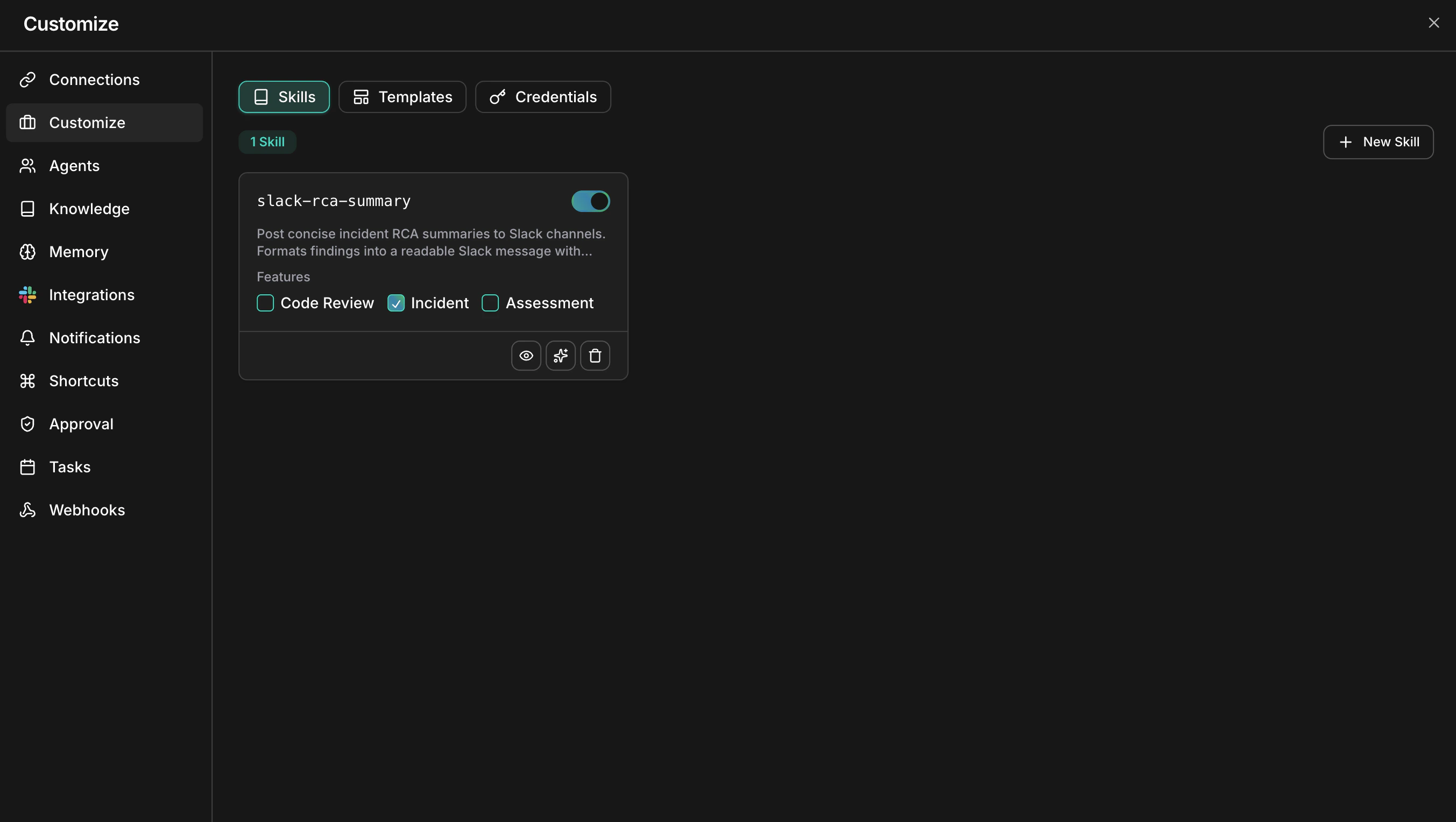
2. **Enable** — toggle the skill on in your workspace. Disabled skills are saved but never loaded.
3. **Assign** — scope the skill to the features where it applies: Code Review, Incident, Assessment, or any combination.
4. **Apply** — when an agent runs a task in an assigned feature, it loads the skill and follows the instructions alongside its default behavior.

<Frame>
  <img src="https://mintcdn.com/cloudthinker/AeA396afvGSMYSou/images/skills/01-custom-skills-page.png?fit=max&auto=format&n=AeA396afvGSMYSou&q=85&s=d177965127f202fcc12161c16bf16220" alt="Custom Skills management page showing skill cards with enable toggles and feature assignment checkboxes" width="2706" height="1528" data-path="images/skills/01-custom-skills-page.png" />
</Frame>

<p style={{textAlign: 'center', fontSize: '0.9em', color: '#666', marginTop: '8px'}}>The Skills page lists every skill with its enable toggle and feature assignments</p>

## What you can do

| Capability                     | Description                                                                                          | Learn more                                   |
| ------------------------------ | ---------------------------------------------------------------------------------------------------- | -------------------------------------------- |
| Create custom skills           | Build workspace-private skills manually or generate them with AI from a plain-language description   | [Custom skills](/guide/skills/custom-skills) |
| Assign to features             | Scope each skill to Code Review, Incident, or Assessment so it loads only where it belongs           | [Custom skills](/guide/skills/custom-skills) |
| Edit with AI                   | Refine an existing skill through conversation — add examples, remove ambiguity, restructure sections | [Custom skills](/guide/skills/custom-skills) |
| Write effective SKILL.md files | Learn the frontmatter fields, instruction styles, and patterns agents follow most reliably           | [Skill format](/guide/skills/skill-format)   |

## Skills vs the knowledge base

Skills tell agents how to act; the [knowledge base](/guide/knowledge) gives agents information to look up. They complement each other — a skill can direct an agent to consult specific documents.

|                   | Skills                                                     | Knowledge base                                                           |
| ----------------- | ---------------------------------------------------------- | ------------------------------------------------------------------------ |
| Content           | Rules and procedures agents follow                         | Documents and websites agents reference                                  |
| Examples          | Review checklists, naming conventions, escalation policies | Runbooks, architecture docs, compliance documents                        |
| How agents use it | Loaded automatically for assigned features                 | Searched with `#kb` or referenced automatically in always-available mode |
| Format            | A `SKILL.md` file (Markdown with YAML frontmatter)         | Uploaded files or crawled websites                                       |
| Best for          | Changing agent behavior                                    | Adding facts and context                                                 |

Rule of thumb: if the agent must follow it on every run, write a skill. If the agent should look it up when relevant, add it to the knowledge base.

## Get started

<CardGroup cols={2}>
  <Card title="Custom skills" icon="wand-magic-sparkles" href="/guide/skills/custom-skills">
    Create, enable, and assign your first workspace skill
  </Card>

  <Card title="Skill format" icon="file-code" href="/guide/skills/skill-format">
    Learn the SKILL.md structure with a complete worked example
  </Card>

  <Card title="Knowledge base" icon="book" href="/guide/knowledge">
    Give agents documents and websites to reference alongside skills
  </Card>

  <Card title="Code review setup" icon="code-pull-request" href="/guide/code-review/setup">
    Connect a repository and see an assigned skill applied to a real PR
  </Card>
</CardGroup>
