> ## Documentation Index
> Fetch the complete documentation index at: https://docs.cloudthinker.io/llms.txt
> Use this file to discover all available pages before exploring further.
# AI Code Review
> Catch bugs, security vulnerabilities, and quality issues on every pull request with context-aware AI reviews
CloudThinker reviews every pull request on your connected GitHub or GitLab repositories with full context of what the change is trying to do, not just individual lines. Findings appear as in-line comments with severity ratings and remediation guidance.
Rules-based scanners match syntax patterns; CloudThinker reads intent. It knows when code touches infrastructure — IAM policies, S3 permissions, database queries — and flags cloud-specific risks alongside logic bugs and vulnerabilities. Security and quality run in a single pass, so reviewers see one set of findings in the tools they already use.
## How it works
1. **Detect** — a developer opens a pull request on a connected repository. CloudThinker picks it up automatically.
2. **Gather context** — [Oliver](/guide/agents/oliver) reads the full diff, the Jira ticket linked from the branch name or PR title, and relevant Confluence documentation.
3. **Analyze** — the review runs in parallel across security, quality, and cloud-infrastructure dimensions.
4. **Post findings** — in-line comments land on the PR with exact line references, severity ratings, and remediation guidance.
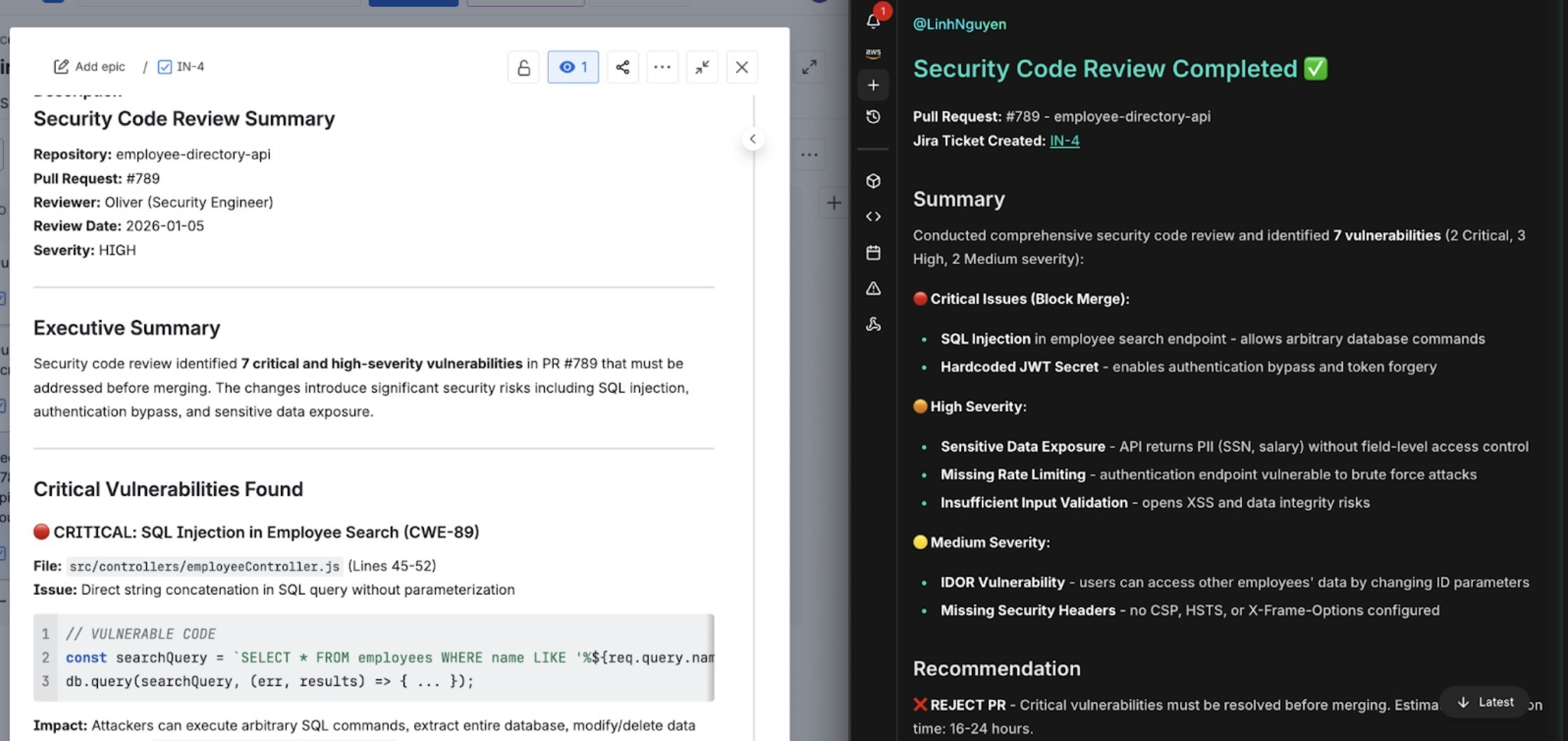
5. **Track** — critical findings auto-create Jira tickets when [Atlassian](/guide/connections/atlassian) is connected. When you push a fix, the next review verifies it and updates the ticket, and every finding feeds the [Leaderboard](/guide/code-review/leaderboard).
A critical finding automatically becomes a Jira ticket with severity, remediation steps, and a link back to the PR
## What you can do
| Capability | Description | Learn more |
| ---------------------- | ------------------------------------------------------------------------------------------- | ------------------------------------------------------- |
| Bug detection | Catch logic errors, null-pointer exceptions, off-by-one errors, and edge cases before merge | [Setup](/guide/code-review/setup) |
| Security analysis | Flag SQL injection, XSS, SSRF, hardcoded secrets, and cloud-specific IAM risks | [Oliver](/guide/agents/oliver) |
| Convention enforcement | Apply the convention files already in your repository to every review | [Convention rules](/guide/code-review/convention-rules) |
| PR commands | Mention `@cloudthinker-ai` in a PR comment to re-review or ask questions | [Mention commands](/guide/code-review/mention-commands) |
| Issue-tracker context | Pull Jira requirements and Confluence standards into reviews; push findings back as tickets | [Extensions](/guide/code-review/extensions) |
| Team analytics | Track review trends, developer scores, and skill coverage over time | [Analytics](/guide/code-review/analytics) |
## Get started
Connect your GitHub or GitLab repositories in under 5 minutes
Interact with CloudThinker directly from PR and MR comments
Teach reviews to follow your team's coding conventions
Track team review activity and code quality improvements over time